Related Articles
Choosing the right storage for a smartphone, laptop, tablet, or computer can be confusing. Many devices are available with different storage capacities, and the price can increase quickly when you choose more space. Before buying a device, it is important to understand how storage works and how much space you actually need.
In this guide, I will explain storage options in simple words so you can make a better buying decision. Whether you are buying a smartphone for everyday use or a computer for work, understanding storage can help you avoid paying for space you will never use.
What Is Device Storage?
Device storage is the place where your files, apps, photos, videos, documents, games, and system data are saved. Unlike RAM, which helps your device run applications smoothly, storage keeps your data available even when the device is turned off.
When you install an application, download a video, take a photo, or save a document, that information uses storage space. The more files and applications you have, the more storage you need.
Storage is usually measured in gigabytes and terabytes. Common smartphone storage options include 64GB, 128GB, 256GB, 512GB, and sometimes 1TB. Computers and laptops often offer larger options because they are commonly used for bigger files and professional applications.
64GB Storage
64GB is one of the smaller storage options available today. It can be enough for someone who mainly uses a phone for calls, messaging, browsing, social media, and a small number of applications.
However, 64GB can become limited quite quickly. The operating system already uses some of the available space, so you will not get the full 64GB for your personal files.
If you take many photos, record videos regularly, download games, or keep lots of applications, 64GB may not be the best choice. It can work for light users, but people who want to keep a device for several years may benefit from choosing more storage.
128GB Storage
For many people, 128GB is a comfortable starting point. It provides enough space for applications, photos, documents, music, and regular videos without requiring constant storage management.
If you use your smartphone normally and do not download large numbers of movies or games, 128GB can be a very practical option.
I would consider 128GB a good choice for everyday users who want reasonable storage without spending too much money. It also gives you more flexibility than 64GB as your collection of photos and applications grows.
256GB Storage
256GB is a popular choice for people who want extra storage for the future. It is especially useful for users who take lots of pictures, record high quality videos, install large games, or download media for offline use.
Modern cameras can produce large image and video files. A few minutes of high quality video can take a significant amount of space. If you regularly record videos, 256GB can provide much more comfort.
Another advantage is that you do not need to delete files as often. This can make the device easier to manage, especially if you plan to use it for several years.
512GB Storage
512GB is generally aimed at heavier users. It is useful for people who store large video collections, professional photographs, large games, music libraries, or work related files.
For a normal smartphone user, 512GB may be more than necessary. However, if you use your phone as a camera, gaming device, entertainment center, and work tool, having extra storage can be very convenient.
The same idea applies to laptops. People who work with video editing, photography, graphic design, software development, or other large projects can benefit from 512GB storage.
1TB Storage
1TB provides a huge amount of storage for most everyday users. It can hold a large collection of photos, videos, applications, games, and documents.
For smartphones, 1TB is usually unnecessary unless you have a specific reason for needing it. Professional photographers, content creators, and people who record lots of high resolution video may find it useful.
For computers, 1TB can be a more practical option. If you regularly work with large projects or need to keep many files on your computer, having 1TB can reduce the need for external storage.
Internal Storage vs External Storage
One important part of understanding storage options is knowing the difference between internal and external storage.
Internal storage is built into the device. Your operating system, applications, and personal files can be stored there. Internal storage is usually faster and more convenient because it is always available.
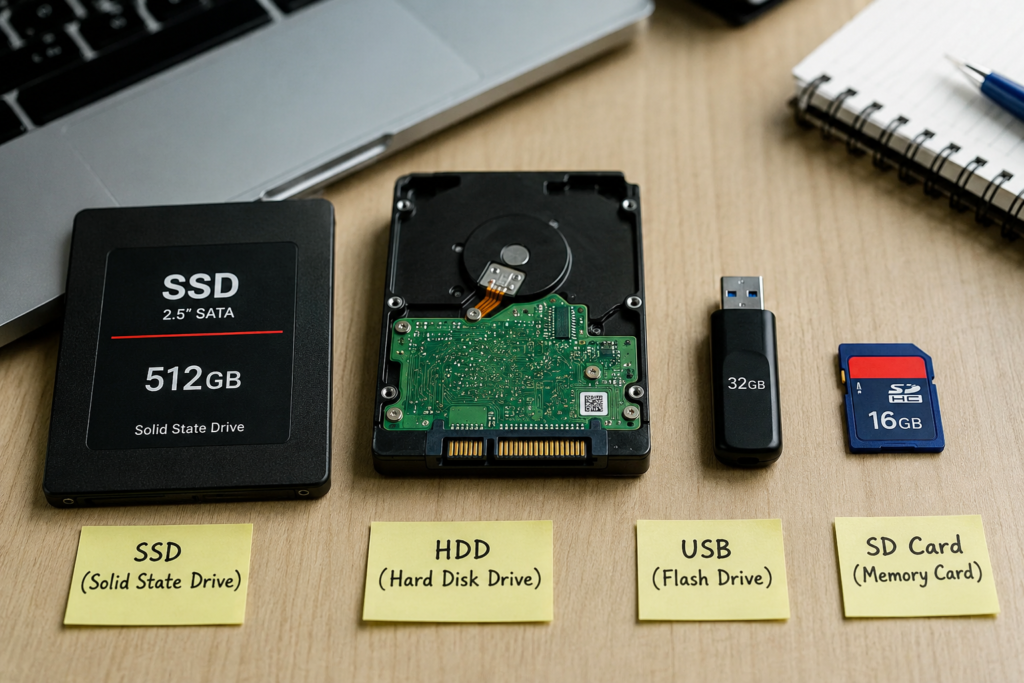
External storage is a separate device used to store files. Examples include memory cards, USB drives, and external solid state drives. External storage can be useful when you need additional space without replacing your main device.
However, not every smartphone or laptop supports expandable storage. Some modern devices do not have a memory card slot, so it is important to check the specifications before buying.
SSD Storage
Solid state drives, commonly called SSDs, are widely used in modern laptops and desktop computers. SSDs use flash memory instead of traditional spinning disks.
One of the biggest advantages of SSD storage is speed. A computer with an SSD can usually start faster, open applications more quickly, and transfer files more efficiently.
SSDs are also quiet because they do not contain moving mechanical parts. They are generally more resistant to physical movement than traditional hard drives.
If you are buying a new laptop or computer, I would strongly recommend choosing SSD storage whenever possible.
Hard Drive Storage
Traditional hard disk drives use spinning disks to store information. They have been used in computers for many years and are still useful when large amounts of storage are needed at a lower price.
The main advantage of a hard drive is that you can often get a large capacity for less money. This makes hard drives useful for storing backups, movies, photos, and other large collections.
The main disadvantage is speed. Hard drives are usually slower than SSDs. They also contain moving parts, which means they can be more sensitive to physical damage.
How Much Storage Do You Need?
The right amount of storage depends on how you use your device.
If you mainly use a smartphone for calls, messages, browsing, and social media, 128GB may be enough.
If you take many photos, download applications, and play games, 256GB can be a better choice.
If you record lots of videos or work with large files, 512GB or more may make sense.
For a laptop, your needs can be very different. Students and office users may be comfortable with 256GB or 512GB. People who edit videos, work with large design files, or manage professional projects may need 1TB or more.
Do Not Buy More Storage Than You Need
More storage sounds better, but it is not always worth paying extra for it. If you rarely save large files and regularly use cloud storage, a smaller capacity can save money.
For example, someone who mostly streams music and videos does not need to store everything directly on the device. On the other hand, someone who travels frequently and wants offline access to large media files may need more storage.
Think about your current habits and how they may change over the next few years before choosing a storage capacity.
Storage and Cloud Services
Cloud storage is another option for managing files. Services such as online photo backups and cloud drives allow you to store files online instead of keeping everything on your device.
Cloud storage can help free up internal storage, but it does not completely replace local storage. You still need enough space for applications, system files, and the content you use regularly.
A good combination can be internal storage for everyday files and cloud storage for backups and less frequently used content.
Final Thoughts on Storage Options Explained
Understanding storage options is important before buying any modern device. Storage affects how many applications, photos, videos, games, and documents you can keep without constantly deleting something.
For most smartphone users, 128GB is a reasonable starting point, while 256GB offers more comfort for people who take lots of photos and videos. Heavy users may prefer 512GB or even 1TB.
For laptops and computers, an SSD is usually the better choice because of its speed and responsiveness. The amount of storage should depend on your work, entertainment habits, and the type of files you normally keep.
The best approach is not simply choosing the biggest storage option available. Instead, think about how you actually use your device and choose a capacity that gives you enough room for your current needs and future growth. By understanding these storage options, you can spend your money wisely and choose a device that remains useful for years.